
- Sun Jun 12, 2016 11:18 am
#49069
Hi all,
I have a button problem with plugged on ESP8266.
I followed the instructions of the arduino site
https://www.arduino.cc/en/Tutorial/Button
The resistor I use is 10k.
Problem is that when I press the button led is off and when button released led is on.
I measured Voltage on the digital pin when button is pressed and is 3.3v as expected.
What am I doing wrong???
Thx all
My Code is

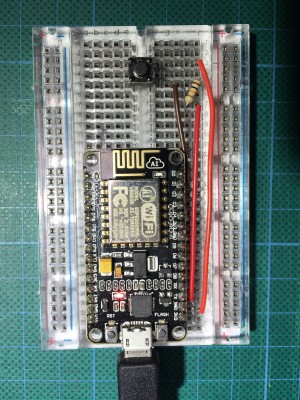
I have a button problem with plugged on ESP8266.
I followed the instructions of the arduino site
https://www.arduino.cc/en/Tutorial/Button
The resistor I use is 10k.
Problem is that when I press the button led is off and when button released led is on.
I measured Voltage on the digital pin when button is pressed and is 3.3v as expected.
What am I doing wrong???
Thx all
My Code is
Code: Select all
const int buttonPin = 5;     // the number of the pushbutton pin
const int ledPin =  16;      // the number of the LED pin

int buttonState = 0;         // variable for reading the pushbutton status

void setup() {
  pinMode(ledPin, OUTPUT);
  pinMode(buttonPin, INPUT);
}

void loop() {
  buttonState = digitalRead(buttonPin);

  if (buttonState == HIGH) {
    digitalWrite(ledPin, HIGH);
  } else {
    digitalWrite(ledPin, LOW);
  }
}


