
- Sun Aug 30, 2020 1:30 pm
#88574
Hello,
I am making a simple control system using technology that i have been using for about 2 years now with no problems. This is the first time i have a bit of difficulty.
Hardware:
1) ESP8266 Wemos D1, powered through 5.1V (external 12V 2A power suply + step-down to get 5.1V, step-down can supply up to 1.5A, much more than i need)
2) 4x DHT22 sensor
Alright so this is 4 sensors on an ESP8266. I power the sensors from the 5V pin on esp8266 board. To clarify, i tried also using 3.3V pin on wemos d1 board with no difference.
Pins used:
- D2, D3, D4, D5 (here i am talking about pins on wemos d1 board, that is, that is how pins are numbered on a board)
The sensor wires are about 1-1.5m long, i used old UTP cable for that.
This is the first time i am actualy using 4 sensors on 1 board, till now i only used 1 or 2 at most. As you can see on image in the attachment, first 3 sensors on pins D2, D3 and D4 are working ok, only the sensor on pin D5 is giving me trouble. I tried switching sensors/wires to see if it helps, i even tried connecting a separate sensor with only 10cm long wire to it, with no difference.
Software used:
- arduino ide and i am using a DHT library for arduino, gave me no problems so far.
Code:
So what could be the problem in this case ? Right now pin D5 is giving me problems but yesterday it was pin D4. My first thought would be the long cables but i read that some people use DHT22 on cables as long as 20 meters and have no problems. And even if this is the reason, it makes no sense that when i connect the sensor with short cable, it makes no difference.
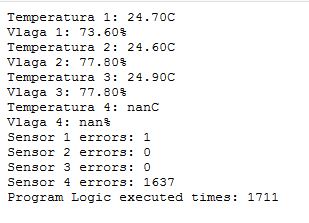 server.JPG (23.6 KiB) Viewed 3811 times
I am making a simple control system using technology that i have been using for about 2 years now with no problems. This is the first time i have a bit of difficulty.
Hardware:
1) ESP8266 Wemos D1, powered through 5.1V (external 12V 2A power suply + step-down to get 5.1V, step-down can supply up to 1.5A, much more than i need)
2) 4x DHT22 sensor
Alright so this is 4 sensors on an ESP8266. I power the sensors from the 5V pin on esp8266 board. To clarify, i tried also using 3.3V pin on wemos d1 board with no difference.
Pins used:
- D2, D3, D4, D5 (here i am talking about pins on wemos d1 board, that is, that is how pins are numbered on a board)
The sensor wires are about 1-1.5m long, i used old UTP cable for that.
This is the first time i am actualy using 4 sensors on 1 board, till now i only used 1 or 2 at most. As you can see on image in the attachment, first 3 sensors on pins D2, D3 and D4 are working ok, only the sensor on pin D5 is giving me trouble. I tried switching sensors/wires to see if it helps, i even tried connecting a separate sensor with only 10cm long wire to it, with no difference.
Software used:
- arduino ide and i am using a DHT library for arduino, gave me no problems so far.
Code:
Code: Select all
for(int i=0;i<3;i++) {

    sensor4_temperature = dht4.readTemperature(); // Gets the values of the temperature

    if(!isnan(sensor4_temperature) && (0 < sensor4_temperature < 100)) break;

    else {

      delay(50);

    }

}
So what could be the problem in this case ? Right now pin D5 is giving me problems but yesterday it was pin D4. My first thought would be the long cables but i read that some people use DHT22 on cables as long as 20 meters and have no problems. And even if this is the reason, it makes no sense that when i connect the sensor with short cable, it makes no difference.


