
- Wed Apr 13, 2016 11:39 am
#45424
Hope I've found the right forum/index.
No matter what I do, resister from 4.7k to 1k, pin numbers, etc. I am unable to get a reading from Onewire and the DS18S20 temperature sensor. I guess I need another set of eyes to note my error. I've just spent the last few hours toying around ... Picture attached. The top right is the temp sensor (yellow=data, red= VCC, Grey = GND)
I was thinking maybe the ESP8266 3.3V isn't enough (I've tested my board to confirm 3.3V out using a multimeter)
The reading I get from the Onewiere is
My code is below and was previously working on an arduino Uno board. The only thing i've changed is the pin. Tried to replicate wiring but I've clearly done something wrong.
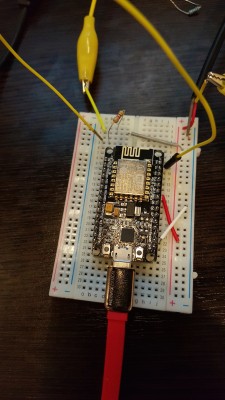
No matter what I do, resister from 4.7k to 1k, pin numbers, etc. I am unable to get a reading from Onewire and the DS18S20 temperature sensor. I guess I need another set of eyes to note my error. I've just spent the last few hours toying around ... Picture attached. The top right is the temp sensor (yellow=data, red= VCC, Grey = GND)
I was thinking maybe the ESP8266 3.3V isn't enough (I've tested my board to confirm 3.3V out using a multimeter)
The reading I get from the Onewiere is
Code: Select all
 ets Jan  8 2013,rst cause:4, boot mode:(3,6)
wdt reset
load 0x4010f000, len 1264, room 16
tail 0
chksum 0x42
csum 0x42
~ld
My code is below and was previously working on an arduino Uno board. The only thing i've changed is the pin. Tried to replicate wiring but I've clearly done something wrong.
Code: Select all
#include <OneWire.h>
#include <ESP8266WiFi.h>
// #include <Base64.h>
// OneWire DS18S20, DS18B20, DS1822 Temperature Example
//
// http://www.pjrc.com/teensy/td_libs_OneWire.html
//
// The DallasTemperature library can do all this work for you!
// http://milesburton.com/Dallas_Temperature_Control_Library


OneWire  ds(2); // 1k resister on here currently
int temperatureLED = 8;

void setup(void) {
  Serial.begin(9600);

  pinMode(8, OUTPUT);
}

void loop(void) {
  byte i;
  byte present = 0;
  byte type_s;
  byte data[12];
  byte addr[8];
  float celsius, fahrenheit;

  if ( !ds.search(addr)) {
    Serial.println("No more addresses.");
    Serial.println();
    ds.reset_search();
    delay(250);
    return;
  }

  Serial.print("ROM =");
  for( i = 0; i < 8; i++) {
    Serial.write(' ');
    Serial.print(addr[i], HEX);
  }

  if (OneWire::crc8(addr, 7) != addr[7]) {
      Serial.println("CRC is not valid!");
      return;
  }
  Serial.println();

  // the first ROM byte indicates which chip
  switch (addr[0]) {
    case 0x10:
      Serial.println("  Chip = DS18S20");  // or old DS1820
      type_s = 1;
      break;
    case 0x28:
      Serial.println("  Chip = DS18B20");
      type_s = 0;
      break;
    case 0x22:
      Serial.println("  Chip = DS1822");
      type_s = 0;
      break;
    default:
      Serial.println("Device is not a DS18x20 family device.");
      return;
  }

  ds.reset();
  ds.select(addr);
  ds.write(0x44);  // start conversion, with parasite power on at the end (the ,1 is parasite 2 wire mode, remove 1 if normal)
  /* ds.write(0x44, 1);  is parasite mode
  */

  delay(1000);     // maybe 750ms is enough, maybe not
  // we might do a ds.depower() here, but the reset will take care of it.

  present = ds.reset();
  ds.select(addr);
  ds.write(0xBE);         // Read Scratchpad

  Serial.print("  Data = ");
  Serial.print(present, HEX);
  Serial.print(" ");
  for ( i = 0; i < 9; i++) {           // we need 9 bytes
    data[i] = ds.read();
    Serial.print(data[i], HEX);
    Serial.print(" ");
  }
  Serial.print(" CRC=");
  Serial.print(OneWire::crc8(data, 8), HEX);
  Serial.println();

  // Convert the data to actual temperature
  // because the result is a 16 bit signed integer, it should
  // be stored to an "int16_t" type, which is always 16 bits
  // even when compiled on a 32 bit processor.
  int16_t raw = (data[1] << 8) | data[0];
  if (type_s) {
    raw = raw << 3; // 9 bit resolution default
    if (data[7] == 0x10) {
      // "count remain" gives full 12 bit resolution
      raw = (raw & 0xFFF0) + 12 - data[6];
    }
  } else {
    byte cfg = (data[4] & 0x60);
    // at lower res, the low bits are undefined, so let's zero them
    if (cfg == 0x00) raw = raw & ~7;  // 9 bit resolution, 93.75 ms
    else if (cfg == 0x20) raw = raw & ~3; // 10 bit res, 187.5 ms
    else if (cfg == 0x40) raw = raw & ~1; // 11 bit res, 375 ms
    //// default is 12 bit resolution, 750 ms conversion time
  }
  celsius = (float)raw / 16.0;
  fahrenheit = celsius * 1.8 + 32.0;
  Serial.print("  Temperature = ");
  Serial.print(celsius);
  Serial.print(" Celsius, ");
  if (celsius > 25) {  // Blink the LED on when temp is greater than 25)
    digitalWrite(temperatureLED, HIGH) ;
    delay (500);
    digitalWrite(temperatureLED, LOW);
  }
  Serial.print(fahrenheit);
  Serial.println(" Fahrenheit");
}


