
- Wed Apr 27, 2016 3:27 pm
#46346
I have an esp8266 nodeMcu that I'm trying to control remotely via wifi. I created a port on my wrt54g using the latest tomato firmware and port forwarding. I am using the Arduino IDE to control the esp8266. According to the serial monitor, the esp8266 is successfully connected to the port, but when I type in the IP address, I get the message that I'm not allowed to use the "restricted network port". Is there a router setting I need to change? I have experience with Arduino but am new to esp8266 and network settings. Thanks!

- Wed Apr 27, 2016 3:57 pm
#46349
Some informations are maybe missing in your post.
when defining a "port forward rule" in a router, this let outside Internet (the WAN) to access devices inside your network thru that port. An exemple : your ESP is a WebServer on port 80, and you added "port forward" to 8080, the ESP is still available on 80 from inside your network, let says from your own PC. But when you are at the supermarket, you connect to your home from your mobile phone (assuming you know the IP or subscribed to some free DNS), you will have to specify port 8080 since you are outside your home.
when defining a "port forward rule" in a router, this let outside Internet (the WAN) to access devices inside your network thru that port. An exemple : your ESP is a WebServer on port 80, and you added "port forward" to 8080, the ESP is still available on 80 from inside your network, let says from your own PC. But when you are at the supermarket, you connect to your home from your mobile phone (assuming you know the IP or subscribed to some free DNS), you will have to specify port 8080 since you are outside your home.
- Wed Apr 27, 2016 6:03 pm
#46356
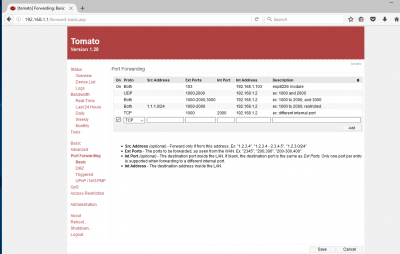
I'm still a little confused by the IP address and port forwarding. When I type in the IP address in a browser, either from my home PC from my phone when away from home, the browser displays a message that the port is protected. I type in the IP address as xx.xxx.xxx.xx:103 because I specified port 103 in port forwarding. The rest of the IP address is the public IP address for my home network according to google when I type in "what is my IP address". Is this the correct way to do it? I'm unable to access the port from any browser even on my home network. Here is a screenshot of the port forwarding page for Tamato:
Attachments
- Thu Apr 28, 2016 8:01 am
#46389
You didn't provide "Internal Port" of the ESP.
What application do you run on your ESP ?
If it is, for example, a WebBrowser running on port 80, then "Internal Port" should be set to 80.
Also, beware that some of the ISPs are blocking isoteric ports such 103, and only allows some standard ones such as 80, 8080, 22, 23 ...
What application do you run on your ESP ?
If it is, for example, a WebBrowser running on port 80, then "Internal Port" should be set to 80.
Also, beware that some of the ISPs are blocking isoteric ports such 103, and only allows some standard ones such as 80, 8080, 22, 23 ...


